
How Accurate Are LEGO® Scanning Apps? (And Why Even the Best Ones Miss)
≈17 min read · Updated August 2026
I build one of these apps, so let me start with the part most scanner companies won't say out loud: the honest answer is “less accurate than the marketing, more useful than the skeptics think, and it depends enormously on what you point it at.”
Before anything else, one distinction that unties almost every confusing claim you've read. “LEGO® scanner” is one name for two completely different machines. One kind reads the printed code on the bottom of sealed Collectible Minifigures boxes... those are essentially perfect, because reading a printed code is a solved problem. The other kind looks at a photo of an actual figure and tries to recognize it... and that one misses, for reasons that are structural, predictable, and manageable once you understand them. The wild spread of accuracy numbers you've seen (from a genuine one hundred percent down to numbers barely a quarter of that) starts with mixing those two machines up.
That's what this guide is: why photo identification fails on LEGO® minifigures (variants, color, partial figs, photo conditions, catalog gaps), what the advertised percentages actually measure, and what to do when your scanner is failing you right now.
Scanner acting up as we speak? Skip straight to the troubleshooting section... it's organized by symptom, and the most common cause isn't what you think.
Two different machines share one name
The code readers first, because they deserve their flowers. Since Series 25, LEGO® Collectible Minifigures boxes carry a small data-matrix code on the base, and free apps can read it and tell you which figure is inside the sealed box. When Brickset ran the code readers' only independent test (November 2024, five apps, twelve Dungeons & Dragons boxes), every single app read every single box correctly. All of them. If sealed blind boxes are your thing, Brickset's verdicts went to omgbricks and Minifig Scan (both free, per that same test)... reading a code off a sealed box is the one job this category basically never gets wrong, and it's a job Figventory doesn't do or need to.
In fact, the one famous story of these apps “getting it wrong” (a run of boxes that scanned as the Dragonborn Paladin and contained the Mind Flayer) turned out, as reported by Brick Fanatics, to be a factory error. The minifigures were in the wrong boxes. The scan was right. The machine read the label perfectly; the label was lying. That's the kind of failure you get when the technology is basically solved... the remaining errors belong to the physical world.
Photo identification is the other machine, and it is very much not solved. It's what Figventory does, what several other apps do, and what the rest of this guide is about. Point a camera at an assembled figure, and software tries to tell you which of roughly nineteen thousand catalogued LEGO® minifigures you're holding. Sometimes it nails a figure that would have taken me ages to look up. Sometimes it confidently hands back a near-twin instead. Both outcomes come from the same mechanism, so let's open the hood.
How photo identification actually works
Photo identification in this space means matching your photo against a reference catalog, and in Figventory's case (and at least one competitor's) the matcher is the same actual engine: Brickognize, the free identification tool built by Piotr Rybak, an independent machine-learning researcher and certified one of us. Credit where it's due... the engine is a gift to this hobby, and everything Figventory adds is built around it, not instead of it.
And Piotr is refreshingly plain about what the technology is. In his words: “So instead of training an image classifier, I decided to build an image search engine. There is a big difference between the two.” A classifier would need to deeply learn what every figure looks like, from lots of photos of each one. A search engine only learns to judge whether two images show the same thing... then your photo gets compared against a reference catalog, and the closest matches win.
That one design fact explains almost everything in this guide. The scanner isn't recognizing your figure the way you recognize your dog. It's ranking lookalikes. It's asking “which catalog entry is this photo closest to?”... and when the catalog contains thousands of near-identical entries, “closest” gets genuinely hard. Piotr again, on plain bricks: “to distinguish a 2 x 4 brick from a 2 x 3 brick. To the machine learning models, they are really similar.” Near-identical neighbors are not an edge case in LEGO®. They are the catalog's defining feature.
Two practical consequences before we get to the failure modes:
- One item at a time is the engine's native mode. Brickognize's own API identifies one item per query (you can send multiple views of the same item, and that helps). Apps that scan a whole tray run detection first (Figventory does, and vendor descriptions of the others read the same way): find each figure in the photo, crop it, then identify each crop separately. Every crop is its own little photo with its own lighting, angle, and neighbors.
- “Confidence” is best read as a similarity score, not a probability. Brickognize labels a score of 0.7 or better a “Strong match” and 0.3 or better a “Possible match.” Useful signals! But a strong match means “this looks very much like the reference image”... which a wrong near-twin can also do. A high score on a lookalike is exactly the failure that costs money.
The five ways scanners miss
Everything below applies to every photo-identification app, mine included. I'm not going to pretend Figventory's raw scans are immune to physics... the honest pitch has always been what happens after the scan, and we'll get there. First, the misses.
1. Variants: the right figure's identical twin
LEGO® has made many nearly-identical figures where one is common and its almost-twin is rare. The differences are maddeningly small: an arm color, a hand color, a back print you'd never think to check, printed legs versus dual-molded plastic. Gaps of 5x, 25x, sometimes hundreds-of-x hide inside details you can cover with a fingertip (the worth guide covers what that does to pricing).
Now remember what the scanner is doing: ranking your photo against the catalog by visual similarity. Two variants that differ by a hand color are, to the model, almost the same image. The single published experiment on this is old but perfect: Brickset's 2021 review of the Instabrick scanner (a hardware product; tests by CCC) swapped a torso's dark bluish grey arms for light bluish grey... and the correct assembly dropped to POSITION SIX in the results list (the top match was the right torso with no arms at all). Right figure, wrong arm shade, and the truth is five spots down.
That's the variant problem in one sentence: the scanner's best guess and the correct answer are often neighbors, and the details that separate them are the smallest printed or molded elements on the figure. When the result matters, confirm the exact version before you trust it: check the arms, hands, back print, and leg construction against the catalog entry's photos. (The identification guide walks the exact-version check, and the variant-differences reference covers the axes that separate near-twins in detail.)
2. Color: sixteen grays, one kitchen light
BrickLink's color catalog lists 214 colors as of this writing. Sixteen of them have “Gray” in the name. Eleven have “Brown.” I ran the math on how far apart the catalog's own reference swatches sit, using the standard perceptual color measure (CIELAB ΔE, where about 2.3 is the smallest difference an average person can notice at all): Light Gray vs Light Bluish Gray comes out around 6.5. Dark Gray vs Dark Bluish Gray, about 6.2. Brown vs Reddish Brown, about 7.2. These are reference swatches on a screen rather than measured plastic, so treat the numbers as illustration... but the illustration is: pairs of official LEGO® colors sit a few just-noticeable-differences apart from each other. Now photograph one under your kitchen light and ask software which of the sixteen grays it is.
This is the exact axis where that 2021 Instabrick review failed hardest: “The greys and browns and to some extent blues and greens produced particularly bad results.” It misread old light grey as light bluish grey. It returned a black 2x4 as reddish brown. And in the parts-scanning world, one major app simply opted out: Brickit's developer, replying to a user in April 2024, wrote “Right, Brickit does not take into account the colors of the details. This is our conscious decision.” For suggesting fun builds from a pile, defensible. For minifigures, where an arm shade can be the whole ballgame... color isn't optional, and it's genuinely hard.
3. Partial figures: a photo can't show what's missing
Here's a limitation baked into the entire approach: the catalog is full of complete figures, so your photo gets matched against complete figures. A photo shows what's there. It cannot show what's absent.
Scan a figure that's missing its hair piece, wearing the wrong hands, or carrying no accessory, and a photo identifier will usually still find the figure... it keys heavily off the torso print, which is the most distinctive thing in frame. What it won't do is tell you the figure is incomplete, because it has no idea. It matched a picture. Even the vendors say so when you read past the headlines: one competitor's own how-to guide tells users to assemble figures before scanning because “the AI matches against complete minifigures,” and notes that a scanner will still identify a figure missing its accessory... “keep in mind that the price shown assumes a complete figure.” That last sentence deserves a highlighter. An identification is not a condition report, and no photo app's identification (mine included, at the raw-scan layer) can detect from a photo which part is missing or wrong. The torso dependence is real enough that BrickScan's early fans documented it from the other direction... one German reviewer noted back in 2022 (translated) that figures without a classic torso, like Battle Droids or skeletons, simply didn't work.
If you buy, sell, or catalog figures, this is the failure mode that costs actual money, and it's why verification exists as a separate step from identification. More on that at the end.
4. Photo conditions: the identity is two square centimeters of ink
A minifigure is about four centimeters tall, and most of what makes it this figure instead of that one is the printing on the front of the torso... a couple of square centimeters of ink on glossy curved plastic. Everything about your photo either protects that signal or destroys it:
- Glare: glossy plastic reflects light in hot white patches that land exactly where the print is. Flash is the classic culprit.
- Angle: shoot from the side or high above and the torso print distorts or half-disappears.
- Backgrounds: busy carpet or a patterned tablecloth makes it harder to even find the figure's outline.
- Crowding: figures too close together can merge into one detection box in bulk mode.
- Wear: and sometimes the print itself is gone. A well-loved 1980s figure with a worn torso isn't a hard photo. It's missing information that no longer exists on the plastic.
None of this is me making excuses for the technology... the vendors' own help pages say the same things, and honestly, credit where due: brick'em's photo guidance is the most thorough published anywhere (bright even lighting, plain background, straight-on angle, finger-width spacing... good advice, as of August 2026, and I follow the same principles). The difference between a bad day and a great day with any of these apps is mostly the photo, not the app.
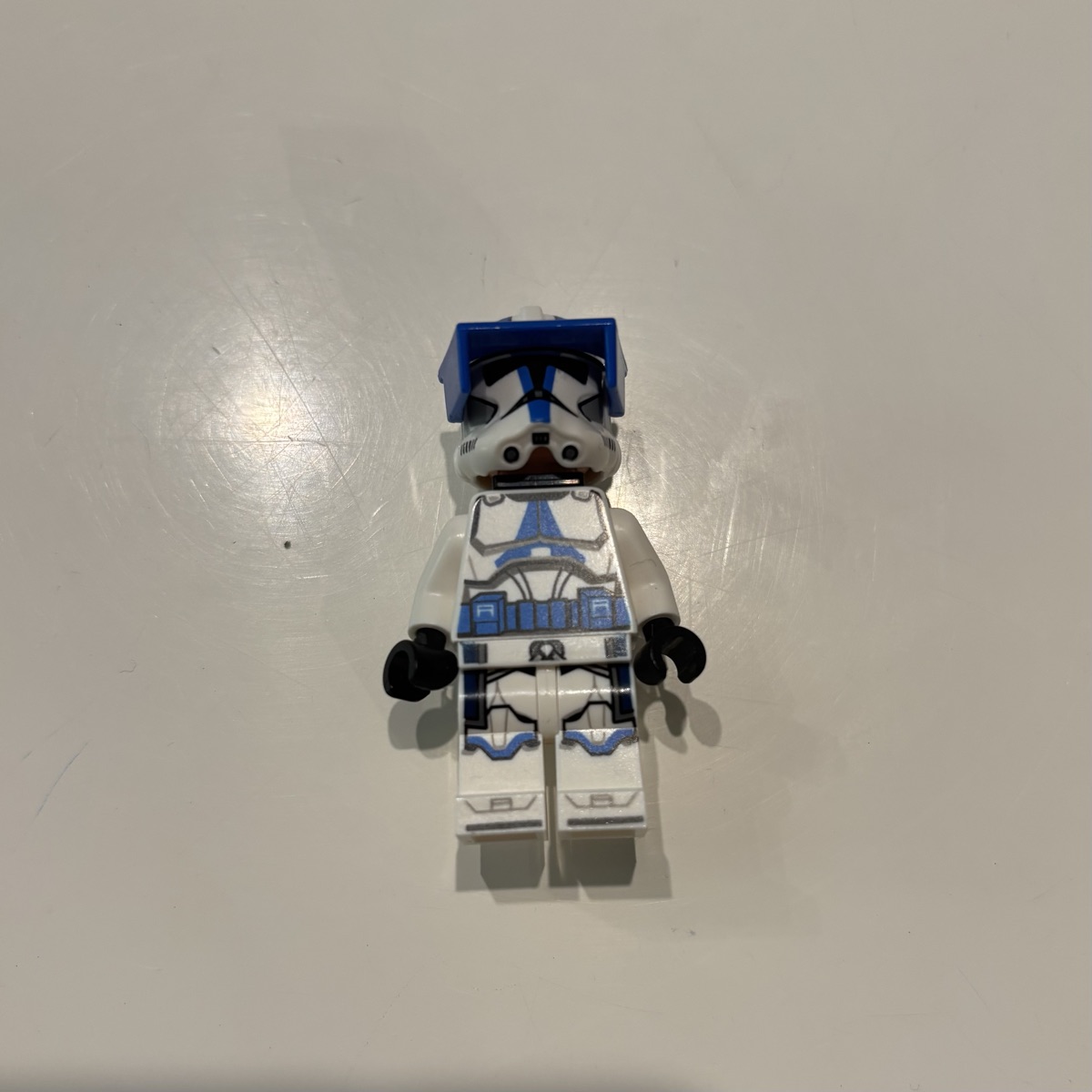
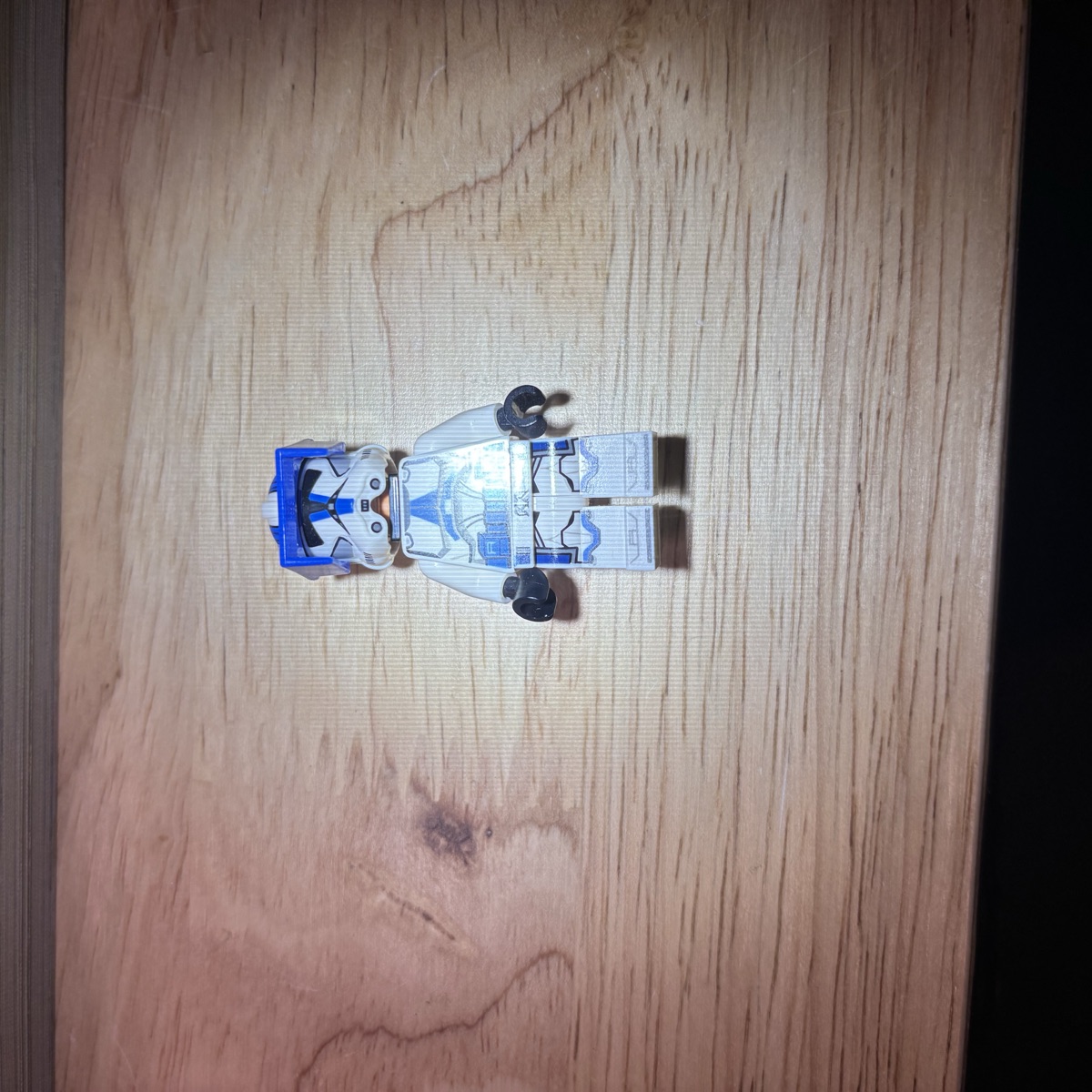
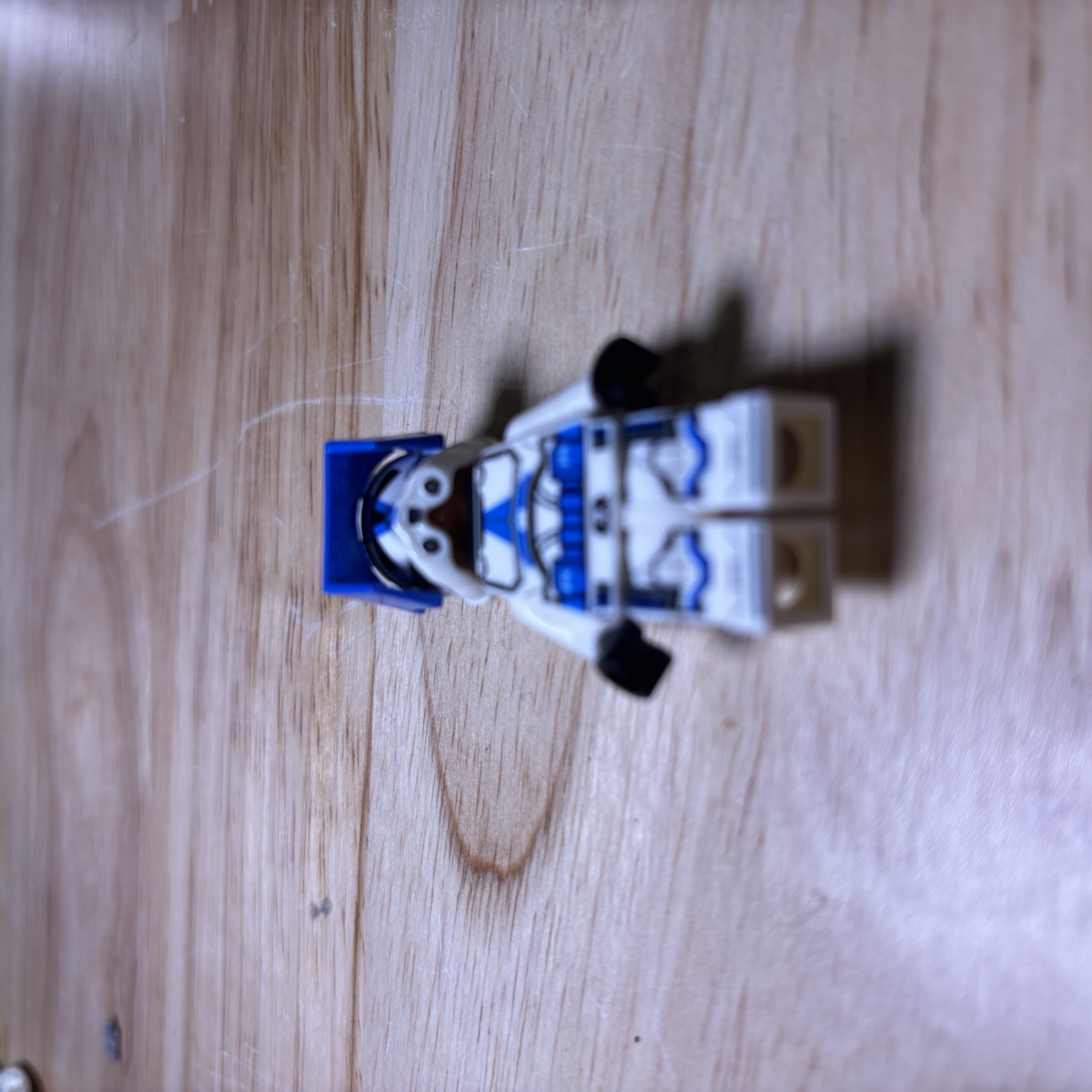
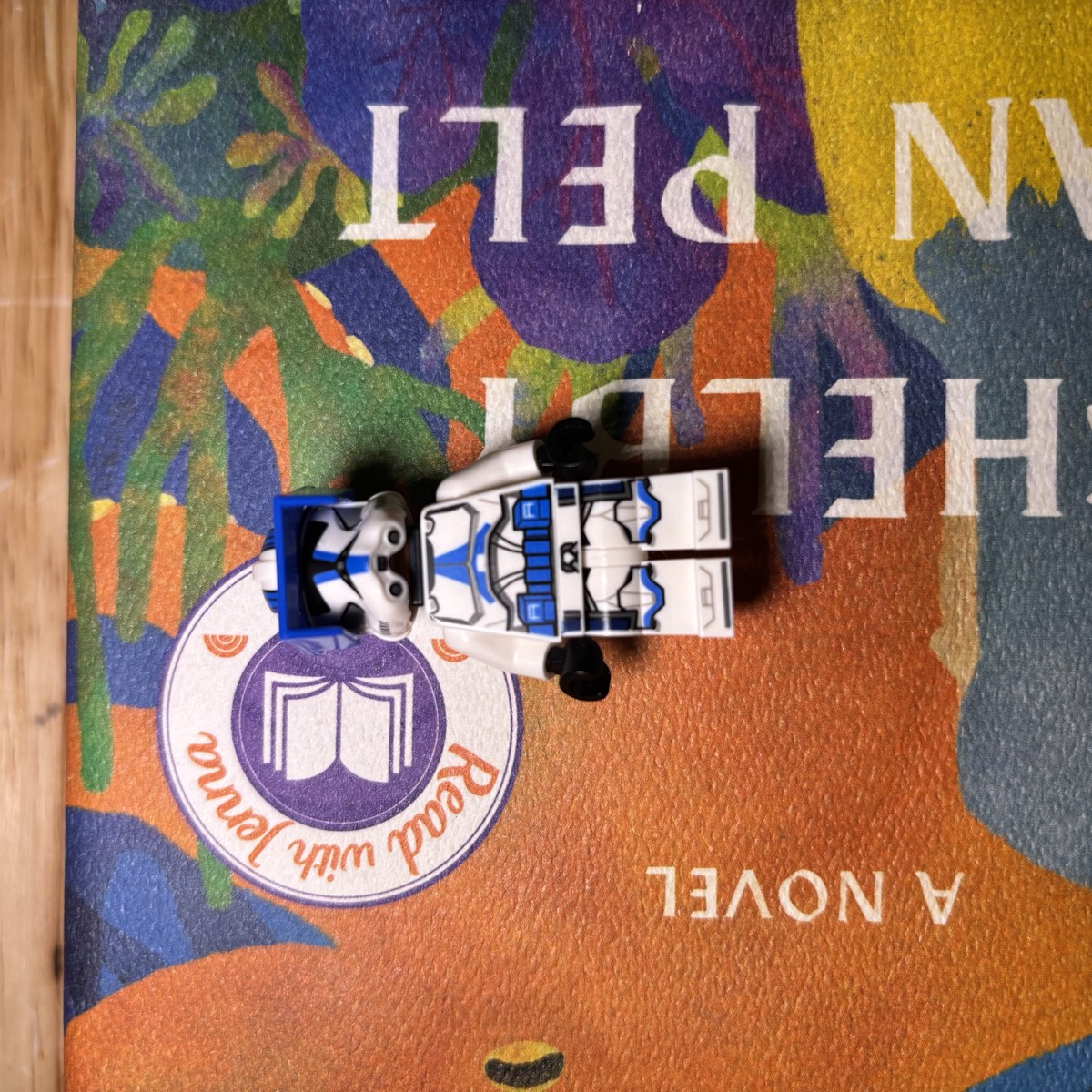
One fig, four photos, one attempt each. The figure is a 501st clone trooper officer (sw1246), whose torso print is distinctive and unworn. I shot it on white paper in soft light, then under a desk lamp with the hot spot right across the torso, then lying down from the feet end so the print foreshortened, then on the busiest book cover in the house. The scanner returned the right figure every time, on the first try. Fifteen shots in the same sitting came back the same way; two of the harsher ones listed one other candidate alongside the right answer, the rest returned it alone. That is the point of this whole section in one picture: with a good print, the photo barely mattered. The advice above is for the day the print is marginal.
5. Catalog gaps: you can't find what isn't filed
A search engine can only return things that are in its index. Three different kinds of figures aren't, and they produce identical-looking failures with completely different fixes:
- Too new. Catalogs and scanner databases lag releases. Real example, from a Brickify user this month (August 2026): “Have been waiting 5 days to add an August 1st set to my collection...” with no update yet at the time of writing. A lag measured in days is actually the good case; reviewers of various apps report month-plus gaps. If your figure released recently, the scanner may simply not know it exists. The fix is patience, not better lighting.
- Too old or too obscure. The long tail is long. Reviewers report decades-old parts and figures missing from various apps' databases... one meticulous Pileometer user listed the exact BrickLink part numbers from their 80s and 90s childhood bulk that the app didn't know (an x47 hose nozzle, a 4502c). If your bin came out of an attic, expect some no-matches that aren't your fault. And important: a no-match on an old figure does not mean a worthless figure. Old and obscure is exactly the profile that deserves a manual look (the identification guide covers the by-hand methods).
- Never existed. Kids mix parts (brick'em's word for the result, and I love it: “Frankenfigs”). The custom-figure world prints entirely new designs on genuine LEGO® parts (Citizen Brick, Minifigs.me, FireStar and friends... a real and thriving market). None of these have catalog entries, and BrickLink's own rules keep the reference catalog that way: it admits only items of official LEGO® release, and the marketplace bans custom-printed parts outright. The catalogs these scanner apps match against list official releases, so a custom or mixed-parts figure isn't “hard to recognize”... there is nothing in the search space for it to be. The scanner will either shrug, or worse, hand you the nearest official lookalike with a straight face (more on that in the troubleshooting section).
What the advertised percentages actually measure
So, the number you came for. Here is the entire published, independent testing record for photo-based LEGO® identification:
One review. From 2021. Of a hardware scanner.
That's it. Brickset's Instabrick review found about 25% of torsos correctly identified and 5 of 40 heads, with color “particularly bad”... numbers that say nothing about today's apps (the field has genuinely improved) but plenty about how hard the problem is. Since then, no independent test of any current photo-AI app has been published. Not one. (I've looked. Repeatedly.)
Which means every accuracy figure you have ever seen presented as a benchmark for a current scanner app was published by the vendor it flatters. (Users report their own hit rates too... we'll get to those.) One competitor's homepage advertises a 98% self-run benchmark result (as of August 2026)... while the same company's comparison page, live the same day, lists its own accuracy as 75-85% and advises budgeting “5-15% manual review time on bulk lots,” and a third page of theirs says 90%+. Three different numbers, one company, all live simultaneously. I'm not telling you that to dunk on anyone. I'm telling you because it's the clearest possible demonstration that these numbers are marketing surfaces, not measurements... when the same product is 98% and 75-85% at the same time, the real information is that nobody's counting the same way, or being counted by anyone else.
And the same standard applies to me, so let's do the awkward part. Figventory's pricing page says “98%+ of identifications never corrected.” I want to be exact about what that is: it's a correction rate. Of the identifications Figventory users accept, the vast majority are never later changed. It is real and it is measured, and it is NOT an accuracy benchmark... it can't catch a wrong ID that nobody ever notices, and it says nothing about how I'd score on a fixed test set against anyone else. Until someone publishes a replicable, methodology-open benchmark, my number deserves your skepticism exactly like theirs. (I'm building that benchmark now, in public, my own product included. If it embarrasses me, it publishes anyway.)
What does the real-world evidence say, while we wait for real measurement? Read enough app reviews and vendor fine print and a consistent picture forms: users and quieter vendor pages both describe roughly 70-90% (across the reviews and vendor pages I read as of August 2026) on common, complete, well-photographed figures... lower on variants, partials, and worn prints, for all the mechanical reasons above. Treat any scan as a good first guess that nobody has checked yet. That's not a criticism of the technology. It's just what a similarity search over nineteen thousand lookalikes is.
When your LEGO® scanner is not working
Now the practical half. “It's not working” is five different problems that all look identical from the outside, and they have five different fixes. Find your symptom.
| What you're seeing | What it usually means | What to do |
|---|---|---|
| No result / “nothing found” on every fig | Photo conditions, or an app/camera issue | The photo checklist below; restart; check connection |
| No result on SOME figures only | Catalog gap: too new, too old, or not a real catalog figure | Wait (new) · identify manually (old) · disassemble and scan parts (mixed/custom) |
| Wrong figure returned | Lookalike ranked above the truth | Check the app's alternate candidates; verify the variant before trusting |
| Different answer every scan | Borderline match flip-flopping between neighbors | Better photo, then verify manually... a flip-flop IS the low-confidence signal |
| Worked yesterday, stopped today | Usually a scan cap, sometimes a broken update | Check for a paywall prompt or an app update... you may have hit a wall, not a bug |
“It returns nothing at all”
Work the photo first, because it's the cause you control: one figure at a time (or clear spacing in bulk), plain light-colored background, bright EVEN light with no flash, straight-on angle at figure height, fill the frame, tap to focus. Assembled beats disassembled... a bare torso matches worse than a whole figure. If a specific part won't focus, move back and zoom slightly (that one's from BrickScan's own tips page, and it's good advice).
And then, honesty: sometimes you do all of it and still get nothing. One Brickit reviewer in 2025: “We followed the instructions exactly (flattened the pile, spread out the hundreds of pieces, and took the photo from the centre), the scanner didn't even recognize a single piece of Lego.” When the photo is right and the result is still nothing, stop retaking the photo... you're most likely looking at a catalog gap or an app-side problem, which is the next symptom.
“It works on some figures and not others”
This is the catalog-gap signature. Ask which figures fail: if it's the newest ones, the database is lagging the release calendar... give it days to weeks. If it's the oldest ones, you've walked off the well-catalogued path, and a no-match means “go manual,” not “worthless” (here's how). If it's the weird ones... mixed parts, custom prints... there's no catalog entry to find. Disassemble and identify the parts individually instead; parts have catalog entries even when the combination doesn't.
“It returned the wrong figure”
First: this will happen, on any app, and the mechanism section above is why. The practical question is when to catch it. My honest triage, as someone who has priced a lot of figures (this is reasoning, not a measured protocol): double-check any identification you're about to spend or charge real money on... any figure from a variant-heavy licensed theme... any fig with visible print wear... and anything where the app itself seems unsure. Check the app's alternate candidates (good apps show the near-misses, because the right answer is sometimes sitting at position two), then confirm the variant details against the catalog entry.
“It gives me a different answer every scan”
The most unsettling one, and the most diagnostic. One Brickify reviewer ran the experiment deliberately in May 2026: they put Darth Vader's head on a different figure's body, and the scan said “Darth Vader”... then, on rescan, “the Mandalorian.” A mixed fig has no right answer, so you get confident wrong ones, different each time. That's the mechanism in its purest form: when your figure sits between catalog entries (borderline photo, lookalike variants, or a figure that isn't in the catalog at all), tiny changes between scans reorder the top matches. And honestly, Brickify's own blog gives the right advice here: if results flip with lighting or angle, “that's a sign the underlying recognition is shakier than the app wants to let on.” Agreed! A flip-flop is your cue to stop scanning and verify by hand... the app is telling you, in its way, that it doesn't know.
“It worked yesterday and stopped today”
Here's the one no app's help page will tell you, and the single most common “stopped working” story in the reviews I've read: you may have hit an undisclosed limit. Free tiers in this category are real but small, their exact numbers mostly aren't published, and users discover them mid-session. A Pileometer user last year, mid-session: “when i made my 38th scan, it stopped mid scan to say i reached the free cap... this just felt like the rug was pulled from right under my feet.” A BrickSearch user, January 2025: “I only had 12 scans (and only after reaching the limit - I don't recall being informed of the change)...” Even happy reviewers mention it in passing... a five-star BrickScan review from May 2026 notes “u only get 5 or 6 scans each day...” So before you troubleshoot the camera: is there a paywall prompt, a counter, an upgrade screen? You may be at a wall, not a malfunction. (If it's genuinely broken: check for an app update... this category ships fast and occasionally breaks. To be fair it can cut both ways: when a BrickScan update broke the app in May 2026, the fix shipped within 48 hours. Respect.)
What a scanner should do when it isn't sure
After all that, you might expect the guy who builds a scanner app to end with “...but MINE is different, it never misses.” That's actually not where this lands. Figventory's raw identifications run on the same physics as everyone else's, and anybody who tells you otherwise is selling the part of the product that's shared.
What I actually believe, and what I built: when a photo match can't be certain, the honest move is to say so and get a human look, not to guess confidently. Every minifigure Figventory identifies goes to a review step before it enters your collection... because a photo match cannot tell you whether pieces are missing, and I refuse to pretend it can. The close alternates are shown so the position-six problem is survivable. And the thing I'm proudest of, AI Smart Verify, exists precisely because identification and completeness are different questions: it checks a fig against its full part list and flags what's wrong or missing. A user recently described scanning a torso and having it help identify which arms or hands were correct or incorrect as a game-changer, which is the nicest possible way of saying “the scan is the beginning, not the verdict.”
I came to this the hard way. Before Figventory existed, I used to lay out minifigures and hundreds of loose parts on the table and cross-check them against catalog photos piece by piece, with spreadsheets. Brutal... and even with all that, I still built figs that I thought were right but were wrong. That's the real lesson of this whole guide, and it's not about apps: at maximum human diligence, I missed. The details are that small. The tools miss for the same reason we do... they just miss faster, and they never get tired or embarrassed. A scanner that's honest about uncertainty, plus a check step, plus your own eyes on the details that matter: THAT combination is accurate. No single link in that chain is.
FAQ
How accurate are LEGO® scanning apps? There's no independently verified answer... every number presented as a benchmark comes from the vendors themselves, and their own pages disagree with each other. Real-world reports describe good results on common, complete, well-photographed figures and much weaker results on variants, partial figures, and worn prints. Treat any scan as a good first guess and verify anything that matters.
Why does my scanner keep returning the wrong figure? Photo identification ranks catalog lookalikes by visual similarity, and LEGO® makes many nearly identical figures. A near-twin variant can outrank the correct answer, especially with glare, an angled photo, or print wear. Check the app's alternate candidates and confirm the variant details against the catalog before trusting a result that matters.
Why won't my scanner app scan at all? Usually one of: photo conditions (lighting, background, angle, spacing), a catalog gap (figure too new, too old, or a custom or mixed figure with no catalog entry), an undisclosed free-tier scan limit, or a broken app update. The symptom guide above separates them.
Why do scanners confuse similar minifigures? The identity of a minifigure often comes down to a few square centimeters of torso printing or a single arm or hand color, while the underlying technology matches whole-image similarity. Details that small get outweighed by everything the two figures share... which is nearly everything.
Why can't a scanner tell if my minifigure is missing parts? A photo shows what's present, not what's absent, and scanners match against complete catalog figures. No app's identification can detect from a photo which part is missing... an identification is not a completeness check. Completeness is a separate verification step (it's the reason Figventory routes every identified figure to review and offers AI Smart Verify against the full part list).
Why isn't my brand-new figure or set in the app yet? Scanner databases lag the LEGO® release calendar by days to weeks. If it released recently, wait and rescan later... it's a catalog gap, not a photo problem.
Can a scanner identify a custom or mixed-parts figure? No, and it can't in principle: the catalogs these apps match against contain official LEGO® releases only, so a custom-printed or parts-mixed figure has no entry to match. Expect either no result or a confident wrong lookalike. Disassemble and scan the individual parts instead.
Do the accuracy percentages scanner apps advertise mean anything? Not much, yet. No current app has been independently tested, vendors score themselves with unpublished methods, and the same vendor sometimes publishes conflicting numbers. Until a replicable public benchmark exists (I'm building one), read every percentage, including mine, as marketing.
Thanks for reading this far... genuinely. This is the guide I wish I could have read years ago, back when I assumed a confident answer meant a correct one, and a few of those assumptions cost me real money.
If you want the scanner that treats its own guesses with appropriate suspicion: Figventory is free to try, it reviews before it commits, and it verifies figs down to the parts. Zero pressure... honestly, even if you never sign up, photograph your figs in good light, check the arms twice, and you'll be ahead of most of us. 🙂
— Matt, Chief Fig Officer